Taco Mata

Taco Mata

Google UX/UI Design Program

Google UX/UI Design Program

Project Overview

Product: A digital food ordering platform for a Filipino-Mexican fusion food truck

Project Duration: December 2024 - February 2025

Problem: Customers often experience long wait times and difficulty accessing an up-to-date menu, leading to frustration and missed opportunities for efficient ordering. Additionally, the lack of a digital ordering system makes it harder for customers to customize their meals and track their pickups conveniently

Goal: To enhance the food truck experience by creating an intuitive app that allows customers to easily browse the menu, customize orders, and track pickups

Role: UX/UI Designer – Led the research, design, and testing process to develop a seamless user experience that aligns with the Taco Mata brand identity

Responsibilities: User research - interviews, personas, journey maps, competitor analysis; Wireframes & Prototypes - low fidelity, high fidelity; Usability studies; Accessibility considerations

Product: A digital food ordering platform for a Filipino-Mexican fusion food truck

Project Duration: December 2024 - February 2025

Problem: Customers often experience long wait times and difficulty accessing an up-to-date menu, leading to frustration and missed opportunities for efficient ordering. Additionally, the lack of a digital ordering system makes it harder for customers to customize their meals and track their pickups conveniently

Goal: To enhance the food truck experience by creating an intuitive app that allows customers to easily browse the menu, customize orders, and track pickups

Role: UX/UI Designer – Led the research, design, and testing process to develop a seamless user experience that aligns with the Taco Mata brand identity

Responsibilities: User research - interviews, personas, journey maps, competitor analysis; Wireframes & Prototypes - low fidelity, high fidelity; Usability studies; Accessibility considerations

Jump to section

Jump to section

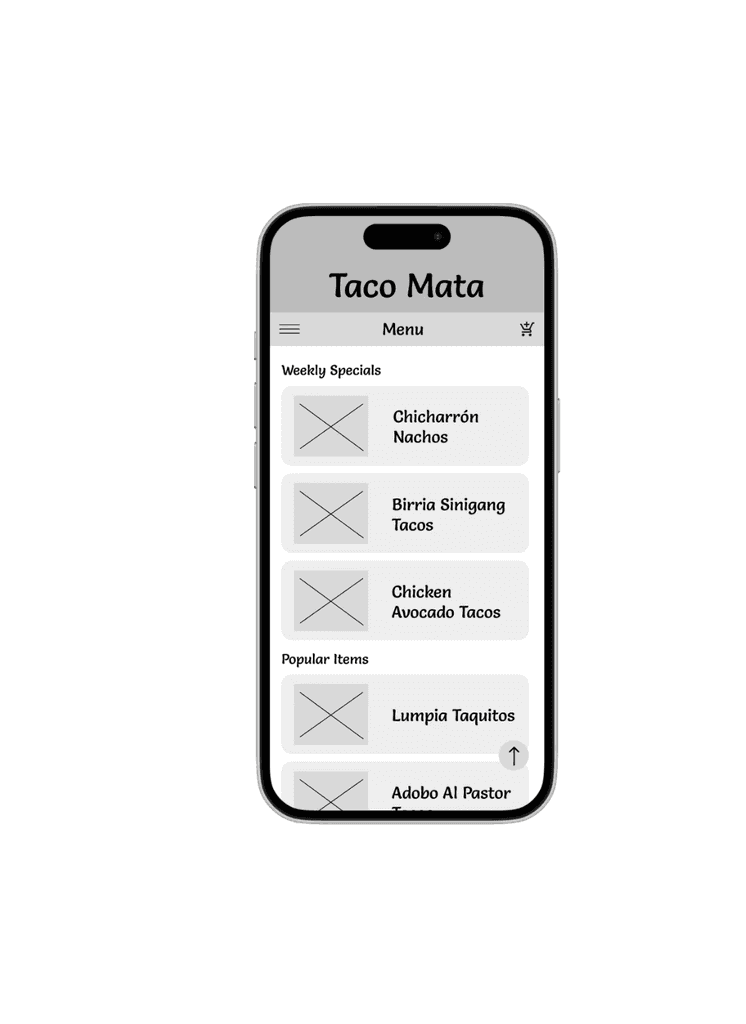
Wireframes - Paper, Digital

User Research: Summary

For my user research, I conducted a mix of user interviews and competitor analysis to understand the needs, goals, and frustrations of potential Taco Mata customers. I initially assumed that most users would be young, tech-savvy food enthusiasts who primarily value bold flavors and visual appeal. However, through interviews with a diverse group of participants, I discovered a broader audience—including older, less tech-savvy individuals—who value simplicity, clarity, and cultural connection just as much as flavor. This research shifted my focus toward designing a solution that balances visual engagement with ease of use, catering to both experienced app users and those seeking a straightforward ordering process.

Pain Points

Complicated App Interface

Users who are less tech-savvy, struggle with confusing layouts or complicated multi-step navigation.  The focus will be on creating a clean and intuitive interface and minimal steps to complete tasks.

Unclear Pickup Times

Busy users feel frustrated when apps don't provide accurate or clear pickup times.  The focus will be on incorporating a dynamic time selector and provide real-time updates.

Lack of Menu Transparency

Customers want detailed information about dishes, including ingredients, dietary tags, and customizability.  The focus will be on designing a menu with detailed descriptions and customization options clearly displayed. 

User Personas
Kevin
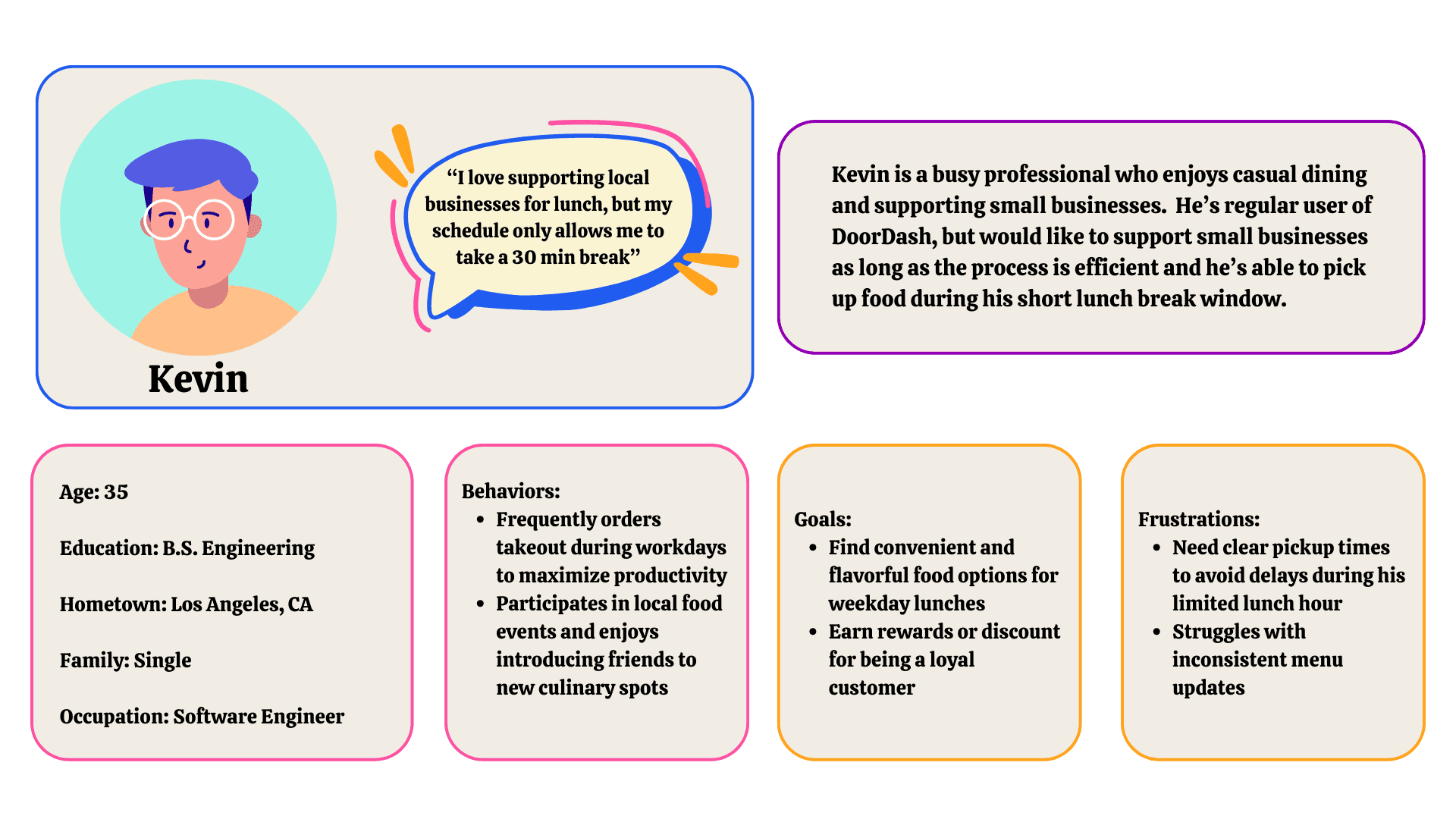
Kevin is a busy professional, seeking an efficient way to order bold, flavorful meals during his limited lunch breaks.  He values clear pickup times and the ability to customize his order but is frustrated by complicated apps or lack of menu transparency.

Kevin is a busy professional, seeking an efficient way to order bold, flavorful meals during his limited lunch breaks.  He values clear pickup times and the ability to customize his order but is frustrated by complicated apps or lack of menu transparency.

Rosa

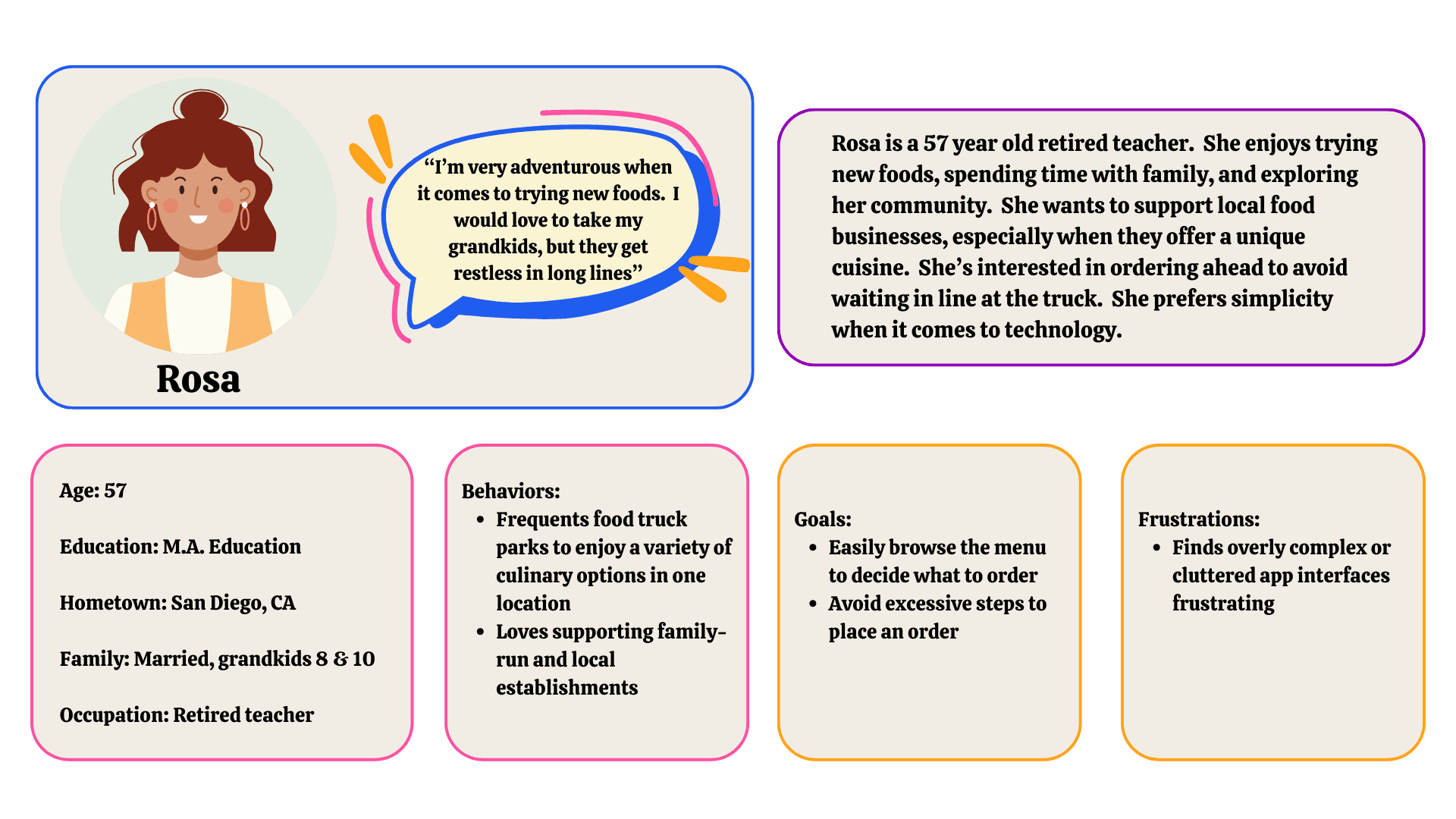
Rosa is a retired teacher and less tech-savvy customer.  She wants a simple, intuitive way to explore the menu and order ahead without feeling overwhelmed by the digital process. 


Rosa is a retired teacher and less tech-savvy customer.  She wants a simple, intuitive way to explore the menu and order ahead without feeling overwhelmed by the digital process. 

User Journey Maps

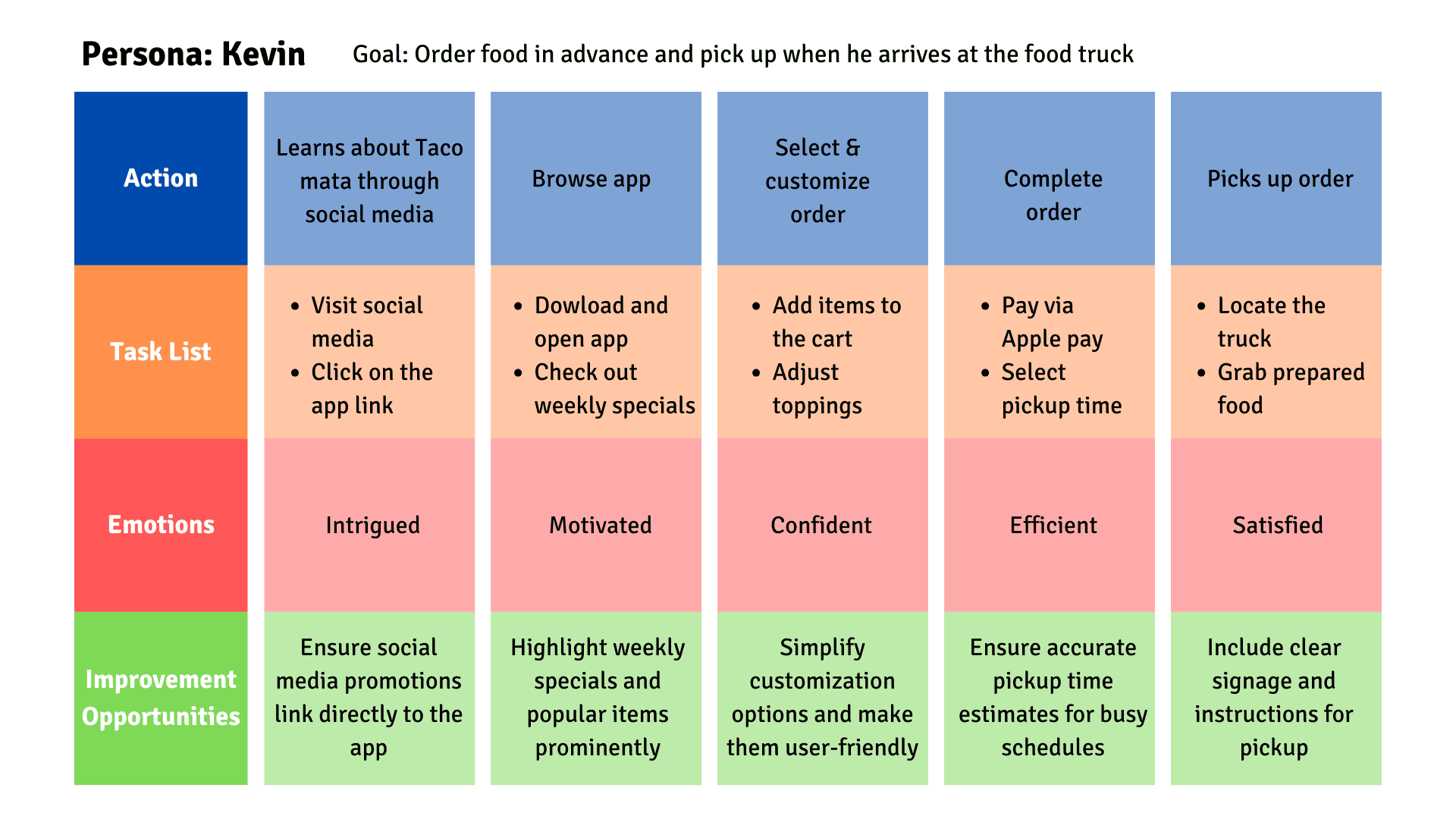
Kevin values speed and convenience in every stage of his journey. Features like quick customization, accurate pickup times, and seamless payment options are critical for meeting his needs. Using social media is a great way to engage busy professionals like Kevin.


Kevin values speed and convenience in every stage of his journey. Features like quick customization, accurate pickup times, and seamless payment options are critical for meeting his needs. Using social media is a great way to engage busy professionals like Kevin.


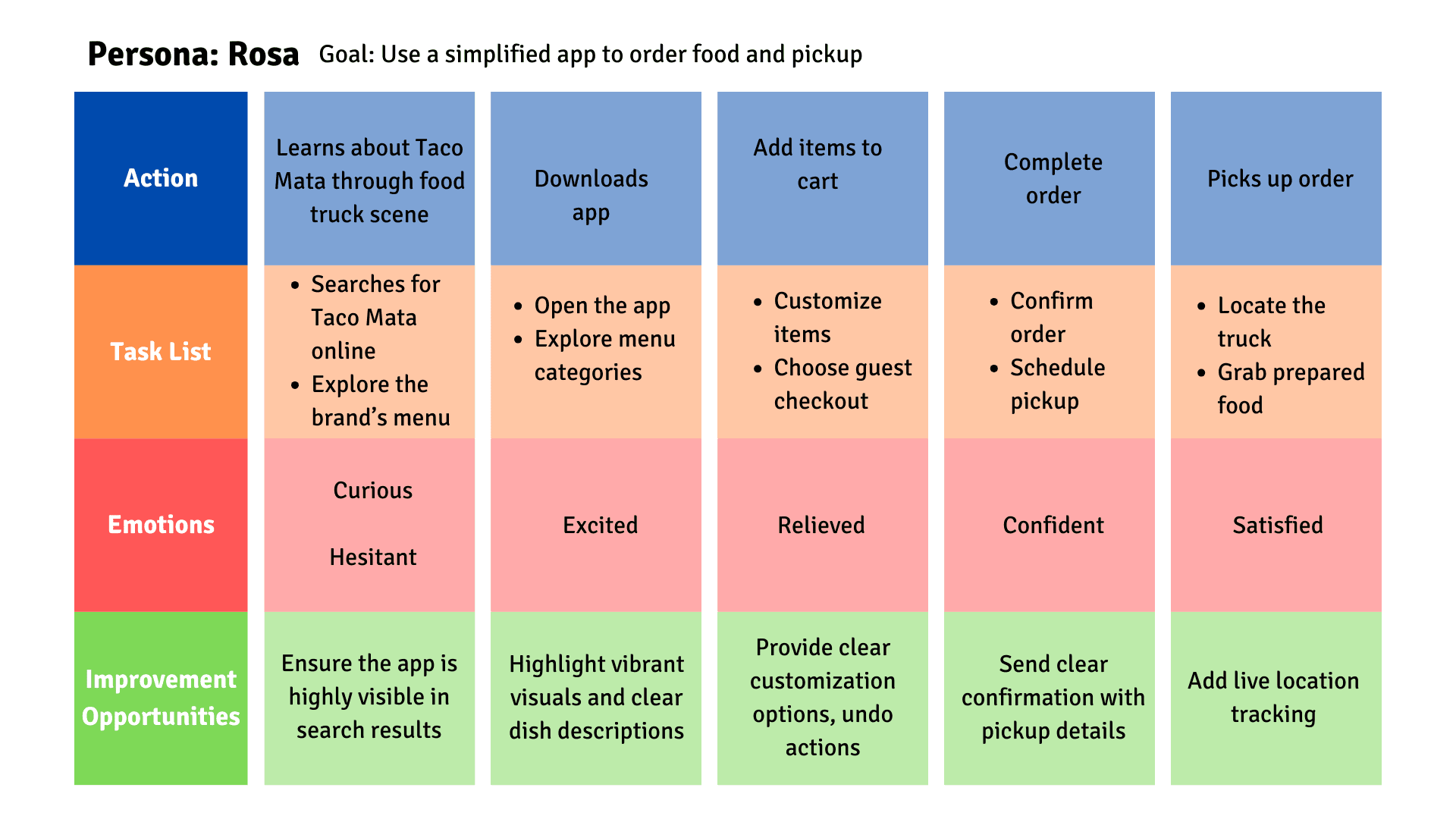
Rosa values simplicity and clarity in her digital interactions.  She’s more confident when the app provide intuitive navigation.  Small features, like a guest checkout option and live truck tracking, greatly improves her experience.  Personal touches, like loyalty notifications, make her feel appreciated and connected to the brand.

Paper Wireframes

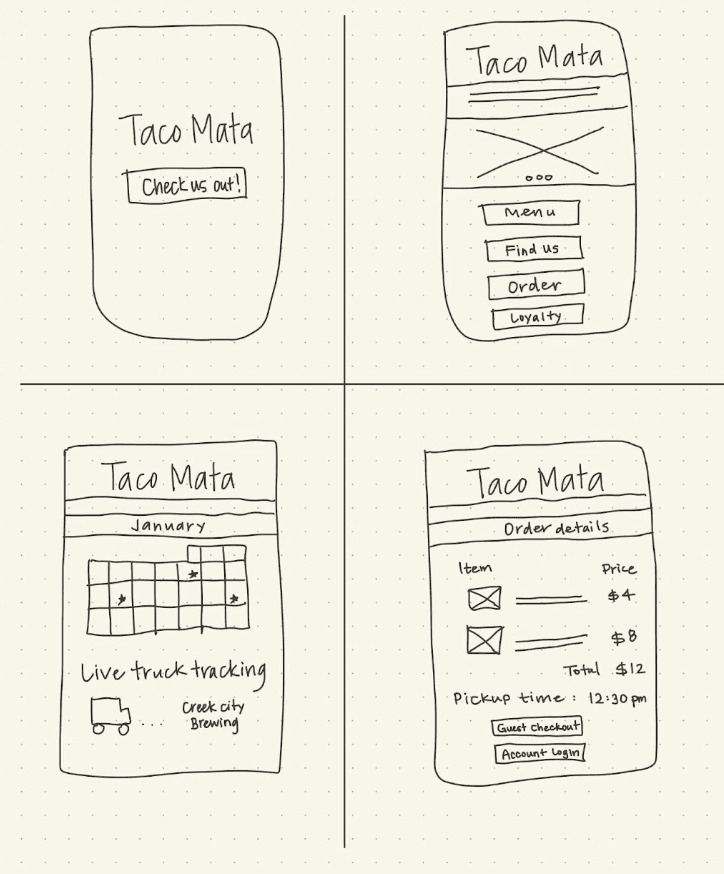
The goal of the paper wireframes was to quickly explore different layout ideas and user flows before committing to digital wireframes. These low-fidelity sketches allowed for rapid iteration, ensuring that the app’s core structure, navigation, and key functionalities were intuitive and aligned with user needs.
Digital Wireframes

Digital Wireframes

Digital Wireframes

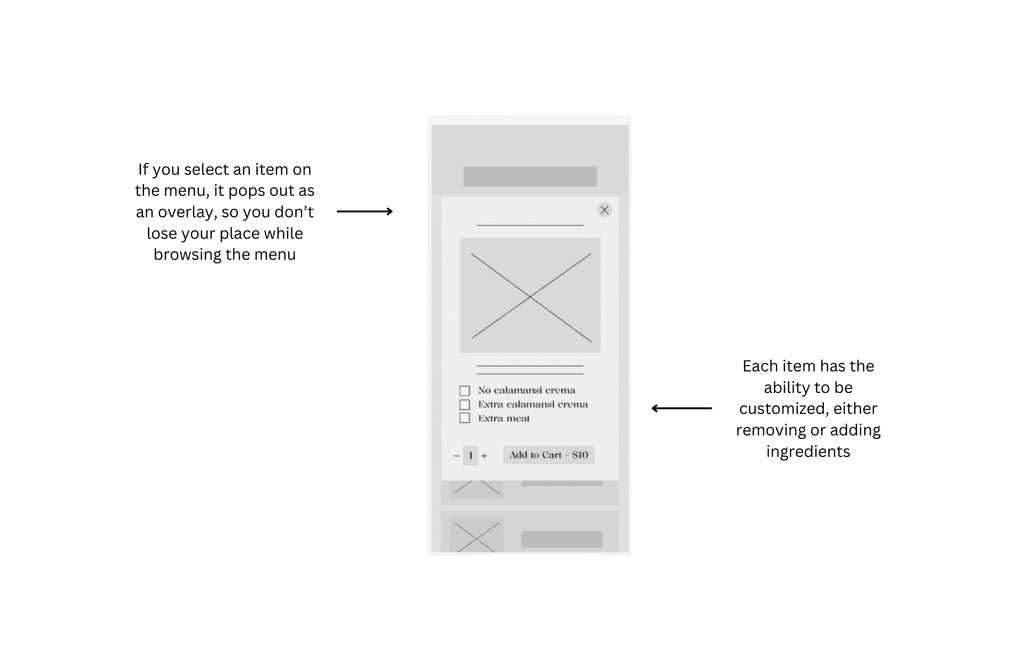
In this frame, I wanted to demonstrate the importance of viewing all of the ingredients in a menu item, then having the opportunity to customize it to the customer's liking.  Customization also supports various dietary restrictions, appealing to a wider audience.
Low Fidelity Prototype

Low Fidelity Prototype

Low Fidelity Prototype

The prototype was created to visualize the app's basic user flow and interactions. It focused on testing core functionalities, such as browsing the menu, customizing orders, and completing the checkout process. This prototype allowed for early usability testing, helping to identify pain points in navigation and interaction design before refining the interface in high-fidelity versions.

The prototype was created to visualize the app's basic user flow and interactions. It focused on testing core functionalities, such as browsing the menu, customizing orders, and completing the checkout process. This prototype allowed for early usability testing, helping to identify pain points in navigation and interaction design before refining the interface in high-fidelity versions.

The prototype was created to visualize the app's basic user flow and interactions. It focused on testing core functionalities, such as browsing the menu, customizing orders, and completing the checkout process. This prototype allowed for early usability testing, helping to identify pain points in navigation and interaction design before refining the interface in high-fidelity versions.

View Lo-Fi Prototype

Usability Studies: Round 1 Findings

User wants clear navigation labels

Users felt overwhelmed by customization options

Users were unsure how to find the truck’s location

Usability Studies: Round 2 Findings

Users requested modification choices to be larger buttons

Users appreciated grouped customization options

Users requested real-time order status updates

Refining the Design
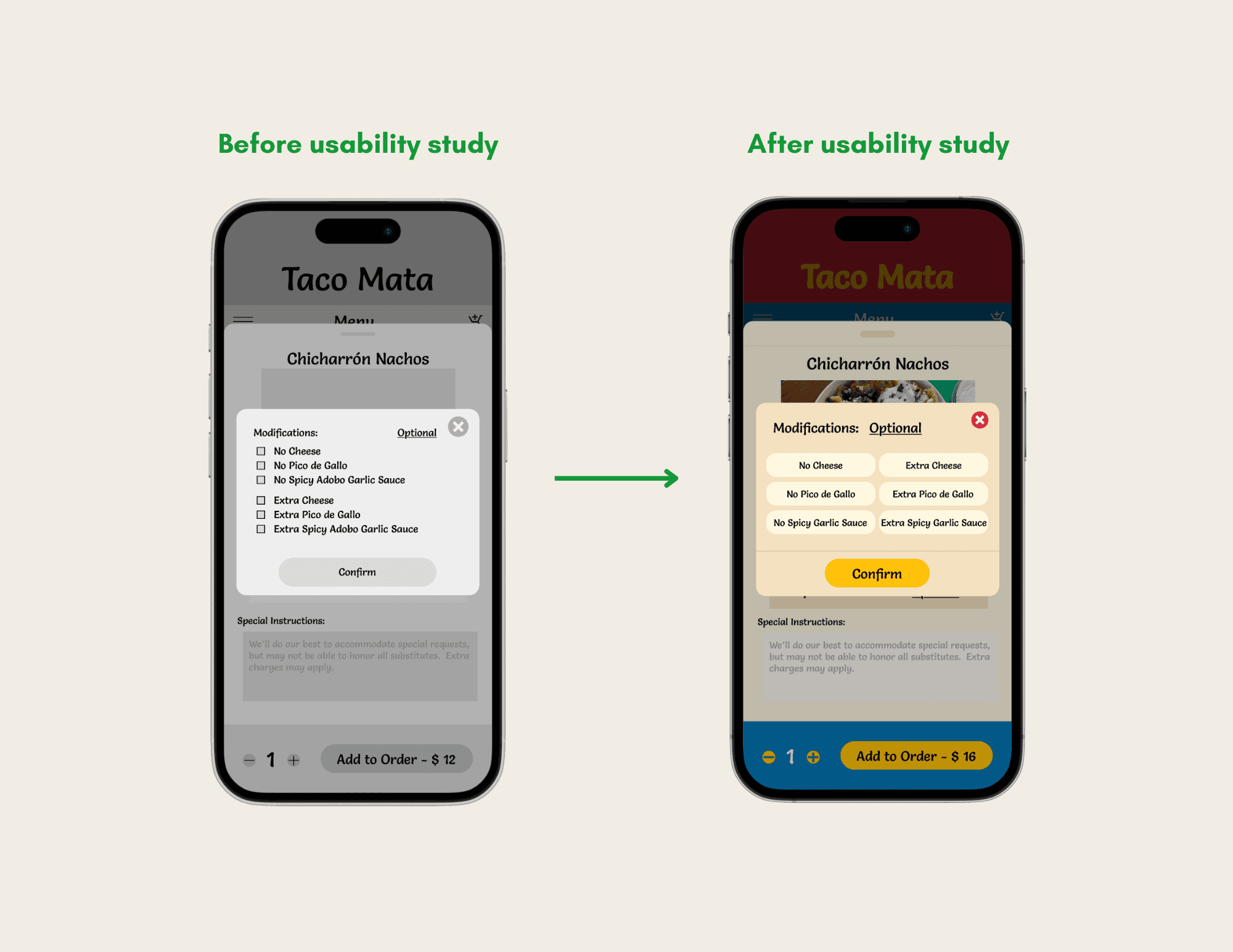
Users expressed changing the checkboxes to larger buttons. This would help decrease the pressing of incorrect options and to further increase accessibility, the buttons will get "highlighted" when pressed, clearly indicating a selection has been made.
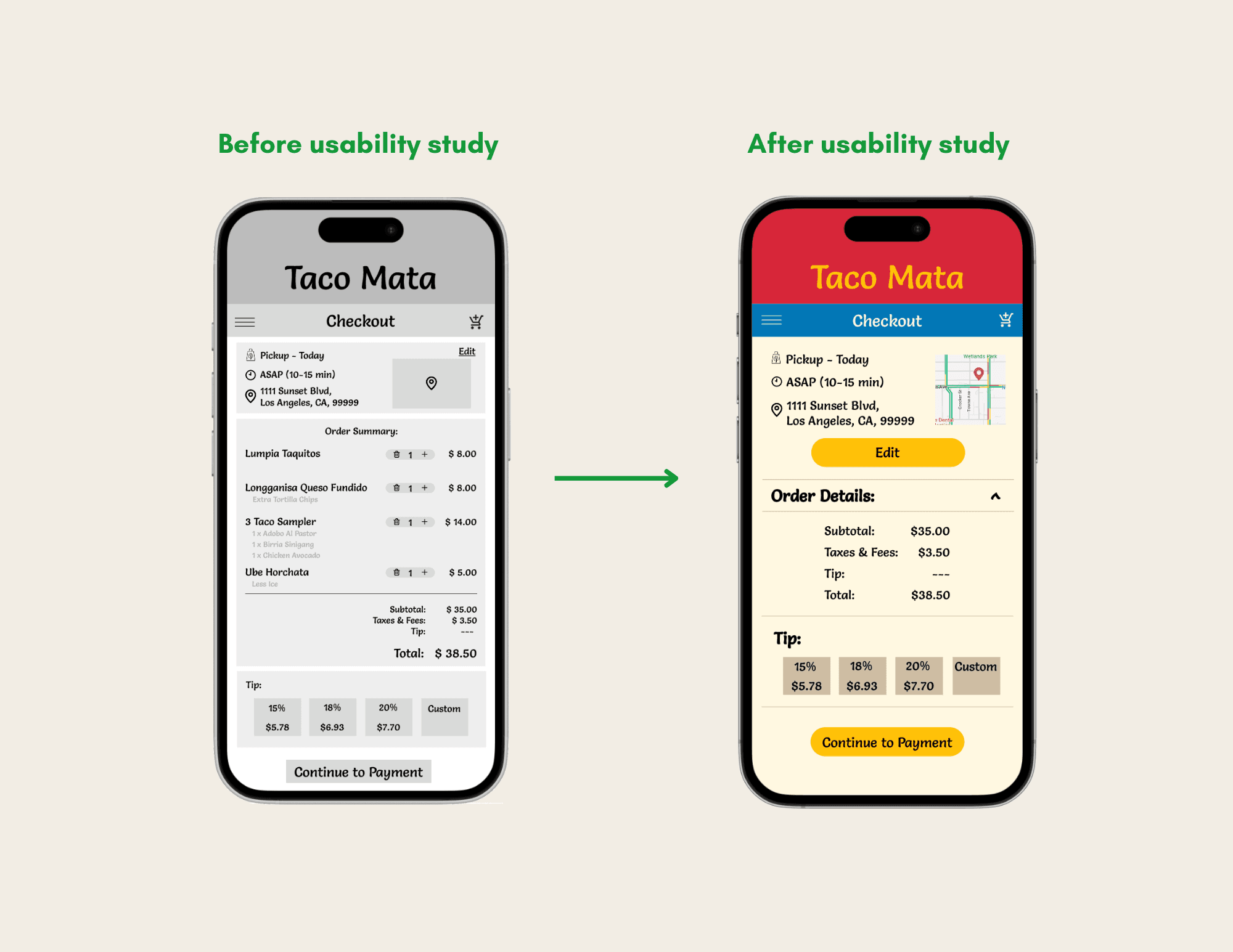

Initially, when checking out, all the important information was presented in one frame; however, that resulted in the font being too small and an overall cluttered look.  Therefore, the information was condensed into a drop down menu, with an option to display all the information, overlays, and larger action buttons.
High Fidelity Prototype

High Fidelity Prototype

High Fidelity Prototype

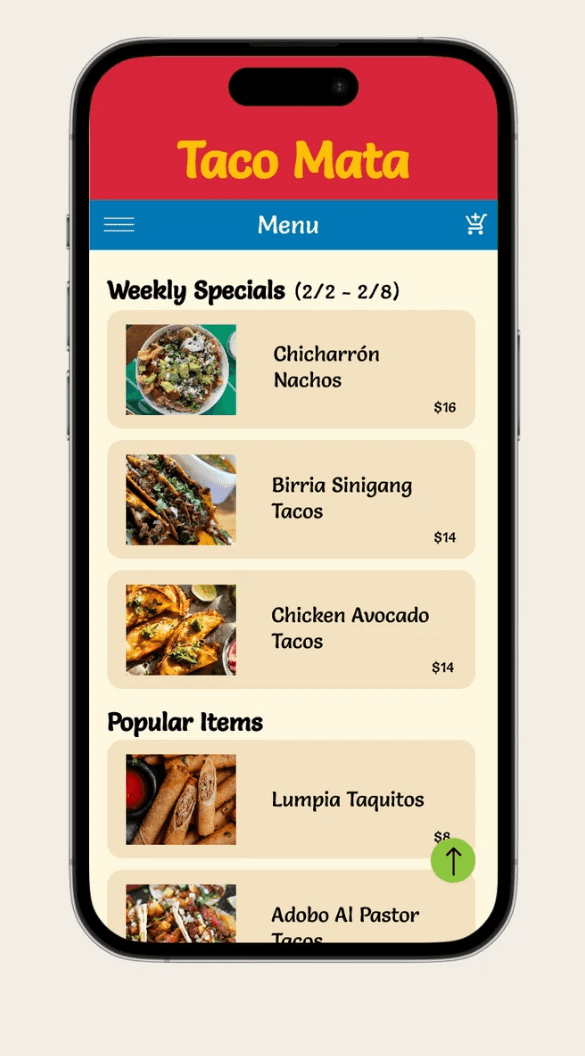
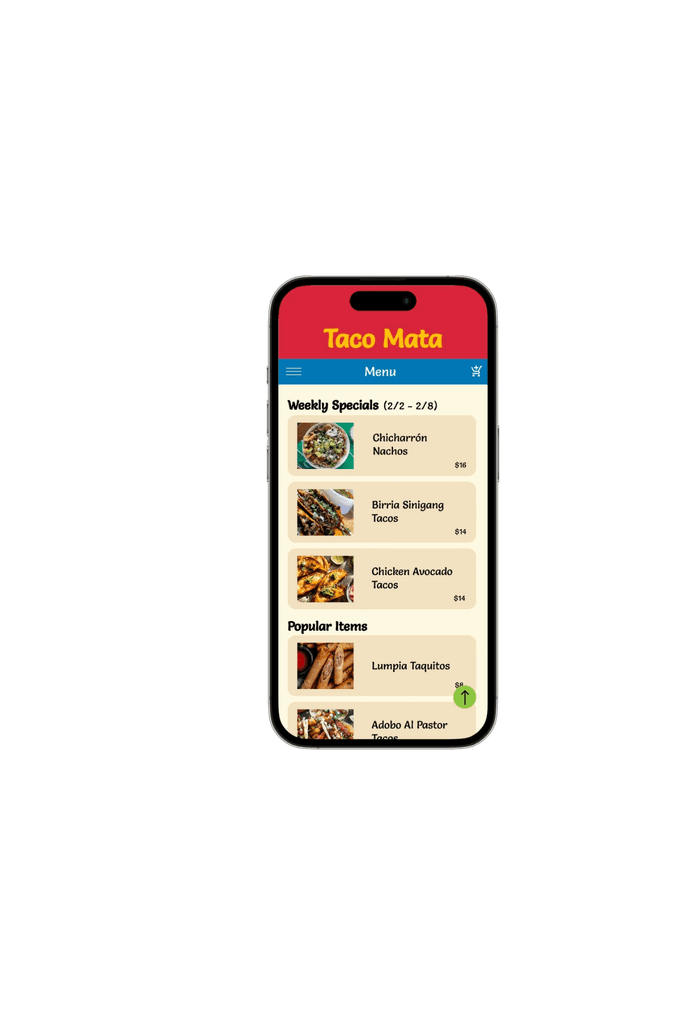
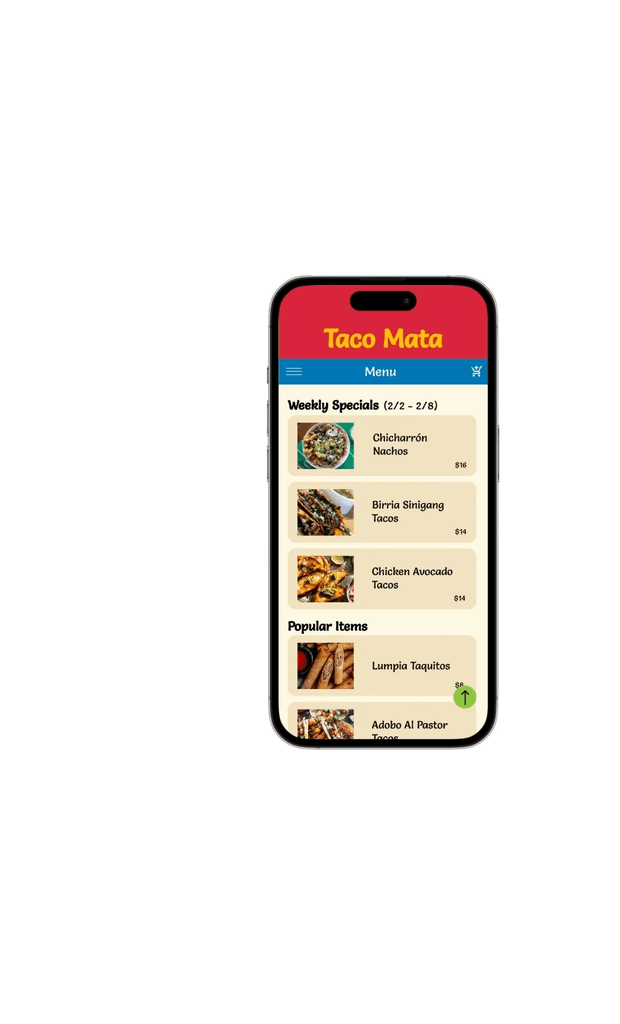
The prototype brought the finalized design vision to life, incorporating refined UI elements, brand colors, typography, and interactive animations. It provided a polished, user-friendly experience, simulating real interactions such as selecting menu items, customizing orders, and completing a transaction.

The prototype brought the finalized design vision to life, incorporating refined UI elements, brand colors, typography, and interactive animations. It provided a polished, user-friendly experience, simulating real interactions such as selecting menu items, customizing orders, and completing a transaction.

The prototype brought the finalized design vision to life, incorporating refined UI elements, brand colors, typography, and interactive animations. It provided a polished, user-friendly experience, simulating real interactions such as selecting menu items, customizing orders, and completing a transaction.

View Hi-Fi Prototype

Accessibility Considerations

Color Contrast

The app’s color palette focused on high-contrast colors for texts and buttons, which would help accommodate users with visual impairments.


Touch Target Size

All interactive elements will need to be large enough and well-spaced to accommodate users with motor disabilities or larger fingers. This will additionally help reduce accidental taps.

Visible Focus Indicators

To support logical navigation, the app will provide visible focus indicators, such as highlighting the active element to make it clear where the user is in the interface.


Color Contrast

The app’s color palette will meets WCAG standards, through high-contrast colors for texts and buttons, which would help accommodate users with visual impairments.

Touch Target Size

All interactive elements will need to be large enough and well-spaced to accommodate users with motor disabilities or larger fingers. This will additionally help reduce accidental taps.

Visible Focus Indicators

To support logical navigation, the app will provide visible focus indicators, such as highlighting the active element to make it clear where the user is in the interface.

Accessibility Considerations

Takeaways

The Taco Mata app empowers users by delivering a seamless, inclusive, and visually engaging experience that balances bold design with user-friendly functionality.  By addressing accessibility, usability, and cultural storytelling, the app strengthens customer loyalty and expands the reach of Taco Mata's Filipino-Mexican fusion concept. 

Throughout this process, I learned the importance of balancing user needs with business goals, especially when designing for diverse audiences with varying levels of tech proficiency.  I also discovered how iterative testing and feedback can reveal unexpected pain points, such as navigation challenges, customization overload, which helped me refine the design to create a more intuitive experience. 

The Taco Mata app empowers users by delivering a seamless, inclusive, and visually engaging experience that balances bold design with user-friendly functionality.  By addressing accessibility, usability, and cultural storytelling, the app strengthens customer loyalty and expands the reach of Taco Mata's Filipino-Mexican fusion concept. 

Throughout this process, I learned the importance of balancing user needs with business goals, especially when designing for diverse audiences with varying levels of tech proficiency.  I also discovered how iterative testing and feedback can reveal unexpected pain points, such as navigation challenges, customization overload, which helped me refine the design to create a more intuitive experience. 

The Taco Mata app empowers users by delivering a seamless, inclusive, and visually engaging experience that balances bold design with user-friendly functionality.  By addressing accessibility, usability, and cultural storytelling, the app strengthens customer loyalty and expands the reach of Taco Mata's Filipino-Mexican fusion concept. 

Throughout this process, I learned the importance of balancing user needs with business goals, especially when designing for diverse audiences with varying levels of tech proficiency.  I also discovered how iterative testing and feedback can reveal unexpected pain points, such as navigation challenges, customization overload, which helped me refine the design to create a more intuitive experience. 

Next Steps

Loyalty Rewards

Create additional rewards features for customers, encouraging customer loyalty

Self Promotion

Market the app through social media and in-person promotions

Delivery Expansion

Expand functionality to include delivery partnerships